Showing posts with label programming. Show all posts

Tuesday, 17 January 2017

Get your Raspberry PI to Read Out your Text Messages using IFTTT

Continuing the theme of talking Raspberry Pi's from my recent posts (Get your RPi to Speak the News and Turn your RPi into a Amazon Echo like device), using the brilliant service IFTTT (If This Then That), I've created a way the my Raspberry Pi reads out a notification whenever I receive a SMS on my (android) mobile phone.

If you don't know what IFTTT is, wikipedia calls it :

IFTTT is a free web-based service that allows users to create chains of simple conditional statements, called "applets", which are triggered based on changes to other web services such as Gmail, Facebook, Instagram, and Pinterest. IFTTT is an abbreviation of "If This Then That".

The below shows the sequence of events of how information regarding a SMS received on your phone ends up on the Raspberry Pi.


In IFTTT, you create an "applet",  which fires a trigger when an SMS arrives on your phone, it then sends this info to the central IFTTT service which then performs an action you select. This action could be to turn on light using something like WeMo or Phillips Hue, or adding a row in a Google Sheet, or even sending a Gmail. But in this case the action is to send a webrequest to my raspberry pi.  The web request is handled by some PHP code using JSON , which reads the info send and then executes

Please note I am using the Android SMS trigger on IFTTTT. There doesn't seem to be an equivalent for IPhones

So what do you need to set this up:

1. Setup your Pi as a Webserver

The below 3 steps are covered on the site: http://www.penguintutor.com/linux/light-webserver
  • Raspberry Pi running a web server such as lighttpd
  • Have a fixed IP or use a dynamic dns service such as noip.com to you have a URL which connects to your Raspberry Pi . You may also need to setup your home router to forward incoming http requests to your Raspberry Pi
  • Install PHP to right server side code to handle IFTTT actions and/or to run other web applications you may want to write. 
2. Setup Script to execute Text to Speech 
3. Setup PHP page to handle request 

  • Create a file readSMS.php in your /var/www  directory (this is the default for lighttpd) with the following content :


if ($_SERVER['REQUEST_METHOD'] == 'POST')
{

   $data = file_get_contents("php://input");

 //Removes all 3 types of line breaks
 $data = str_replace("\r", " ", $data);
 $data = str_replace("\n", " ", $data);  

 $result = json_decode($data, true);

 $myfile = fopen("readSMStest.txt", "w") or die("Unable to open file!");
 fwrite($myfile, $data);


 $strText = "SMS received from " . $result['contact'];
 fwrite($myfile,"\n" .$strText);
 fclose($myfile);

 $strCommand = "sudo /home/pi/Documents/speech.sh" . " " .  $strText ; 

 exec($strCommand, $command_output);

 foreach($command_output as $line) :

  echo $line  ;

 endforeach;

}

?>

  • This code reads the input from an HTTP Post (we will setup IFTTT later to send an http post request) , decodes the JSON sent by IFTTT, and extracts the contact name of who sent the SMS to your phone. It then executes the speech.sh script which you should have set up from the previous step. 
  • You may need to change the $strCommand string to the location of where you saved the speech.sh file
  • The script also for debugging purposed writes a text file readSMStest.txt to the same folder
  • The above can be downloaded from:

4. Create Applet in IFTTT

  • Sign up to IFTTT and download the app to your phone 
  • In the IFTTT site click on My Applets then on the New Applet button
  • You will see the below Applet Maker, click on the "+ this" to setup the trigger (which is any SMS received)


  • Start typing "android" and then click on "Android SMS"
  • Now click on "Any new SMS received"

  • Now click on "+that" to setup the Action
  • Start typing "maker" and select the "Maker" action service. 
  • Click on "Make a web request"
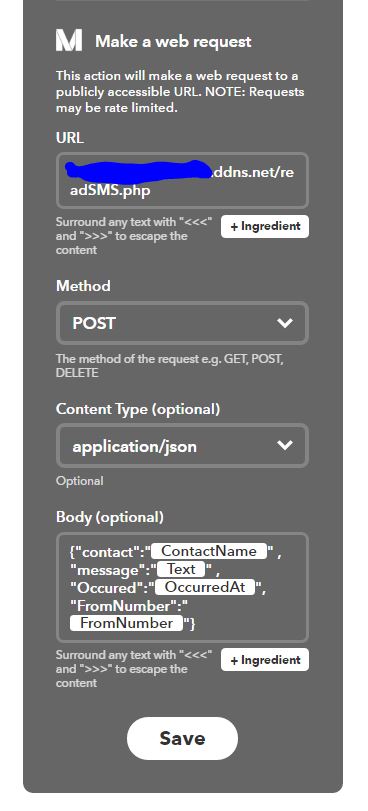
  • Fill in the web request as below:
    • Change the URL to the address of your webserver. 
    • The JSON Body Text is below which is easier to copy and paste. This sends the info about your SMS message to your php page using JSON
    • {"contact":"{{ContactName}}" , "message":"{{Text}}" , "Occured":"{{OccurredAt}}", "FromNumber":"{{FromNumber}}"}
      

  • Hit Save and you're done 
  • You can rename the Applet to whatever you want, and can toggle whether you want logging

5.Test it out

Now all you need to do is test it out. Get somebody to send you a text or send one to yourself and hopefully you should hear your Raspberry PI (remember to turn on the speakers and volume is up) say "SMS received from" and then the name from your address book

6.Customise it

Now you can tailor this to do whatever you want. Maybe read out the full message, or use one for the other triggers. Or maybe get your php page to perform some other action like turning on lights


Hope the above is helpul. Any problems , please leave something in the comments.


Wednesday, 24 July 2013

Turn your Raspberry Pi into an Azaan/Prayer clock


Recently I've been playing with the raspberry pi and given it's Ramadan, I thought I'd see if I could turn it into an Azaan (Islamic call to prayer) clock. Given the RPI is low powered I can leave it on and it doesn't need a monitor, keyboard, mouse, etc plugged in.

This is what I did:

1. Plug in a speaker into the 3.5mm audio output on the raspberry pi

2. Download python code from prayTimes.org to calculate prayer times

3. Download azaan mp3 from prayTimes.org again.

4. Write a python script to set jobs in crontab to play the azaan mp3 at the appropriate time (see code below or download here). The python code from prayTimes.org has to be in the same folder for this to work.

My script utilizes the python crontab library. More info on setting this up available on the links below

Python crontab: http://pypi.python.org/pypi/python-crontab/
Installing modules: http://docs.python.org/2/install/index.html

The bits you may need to configure yourself are:

a) Longitude and Latitude (currently set to London UK)
lat = 51.5171
long = 0.1062

b) Timezone (currently set to 0+GMT and daylight savings =1 )
times = PT.getTimes((now.year,now.month,now.day), (lat, long), 0,1) 

c) Location of azaan mp3:
strPlayAzaanMP3Command = 'omxplayer -o local /home/pi/Downloads/Abdul-Basit.mp3 > /dev/null 2>&1'

The code from prayTimes.org is really configurable, so you can change the prayer time calculation method and a whole load of other adjustments. 

5. Add a job in crontab to run this script on a daily basis to update the azaan times:

# m     h       dom     mon     dow     command
0 1 * * * python /home/pi/Documents/updateAzaanTimers.py > /dev/null 2>&1

6. You're done. For each prayer , the raspberry pi will play the azaan mp3 via the speaker.

For All code and audio files I've used/written are available on the link below:
https://www.dropbox.com/sh/r0e787digng1rgv/OmCXiu9Vx_/RPi%20Azaan%20Clock


#!/usr/bin/env python

import datetime
from praytimes import PrayTimes


#Get Prayer Times
#--------------------
lat = 51.5171
long = 0.1062

now = datetime.datetime.now()


PT = PrayTimes('ISNA') 
times = PT.getTimes((now.year,now.month,now.day), (lat, long), 0,1) 

print times['fajr']
print times['dhuhr']
print times['asr']
print times['maghrib']
print times['isha']


#Update Crontab with Prayer Times
#---------------------------------

from crontab import CronTab


#Function to add azaan time to cron
def addAzaanTime (strPrayerName, strPrayerTime, objCronTab, strCommand):

  job = objCronTab.new(command=strCommand,comment=strPrayerName)
  
  timeArr = strPrayerTime.split(':')

  hour = timeArr[0]
  min = timeArr[1]

  job.minute.on(int(min))
  job.hour.on(int(hour))

  print job

  return


system_cron = CronTab()

strPlayAzaanMP3Command = 'omxplayer -o local /home/pi/Downloads/Abdul-Basit.mp3 > /dev/null 2>&1'

jobs = system_cron.find_command(strPlayAzaanMP3Command)

print jobs

for j in jobs:
  system_cron.remove(j) 

addAzaanTime('fajr',times['fajr'],system_cron,strPlayAzaanMP3Command)
addAzaanTime('dhuhr',times['dhuhr'],system_cron,strPlayAzaanMP3Command)
addAzaanTime('asr',times['asr'],system_cron,strPlayAzaanMP3Command)
addAzaanTime('maghrib',times['maghrib'],system_cron,strPlayAzaanMP3Command)
addAzaanTime('isha',times['isha'],system_cron,strPlayAzaanMP3Command)


system_cron.write()


Tuesday, 13 January 2009

25 most dangerous programming errors

A group of software people from various firms brought together by the NSA have sat around and come up with a list of the most dangerous 25 programming errors . If you been a developer for more than 5 minutes you have probably come across half of these, but this can be used as a handy checklist.

In the words of Paul Kurtz, executive director of a group called the Software Assurance Forum for Excellence in Code "Now, with the Top 25, we can spend less time working with police after the house has been robbed and instead focus on getting locks on the doors before it happens"

Here's my cheap and cheerful run down of through the list.

Each heading links to the site where there is more detail on each , which includes discussion, prevention and mitagations, attack patterns against the error.

15-Jan-08: I haven't had time to comment on each error in the list, but I will do at some point

1. Improper Input Validation
e.g. Alpha characters aren't allowed to be entered in numeric fields, stuff like that
2. Improper Encoding or Escaping of Output
Using stored procs and using correct character encoders
3. Failure to Preserve SQL Query Structure (aka 'SQL Injection')
Make sure a user can't enter sql into a text field that will
4. Failure to Preserve Web Page Structure (aka 'Cross-site Scripting')
5. Failure to Preserve OS Command Structure (aka 'OS Command Injection')
6. Cleartext Transmission of Sensitive Information
7. Cross-Site Request Forgery (CSRF)
8. Race Condition
9. Error Message Information Leak
10. Failure to Constrain Operations within the Bounds of a Memory Buffer
11. External Control of Critical State Data
12. External Control of File Name or Path
13. Untrusted Search Path
14. Failure to Control Generation of Code (aka 'Code Injection')
15. Download of Code Without Integrity Check
16. Improper Resource Shutdown or Release
17. Improper Initialization
18. Incorrect Calculation
19. Improper Access Control (Authorization)
20. Use of a Broken or Risky Cryptographic Algorithm
21. Hard-Coded Password
22. Insecure Permission Assignment for Critical Resource
23. Use of Insufficiently Random Values
24. Execution with Unnecessary Privileges
25. Client-Side Enforcement of Server-Side Security